
IRCTC's photo upload requirements trip up thousands of users every day. The error messages are vague, the portal is unforgiving, and the window for Tatkal booking is only 60 minutes. Getting your photo rejected at the wrong moment means missing your ticket.
This guide covers the exact specifications, common errors, and how to resize your photo to meet IRCTC requirements in under a minute.
IRCTC Photo Requirements (2026)
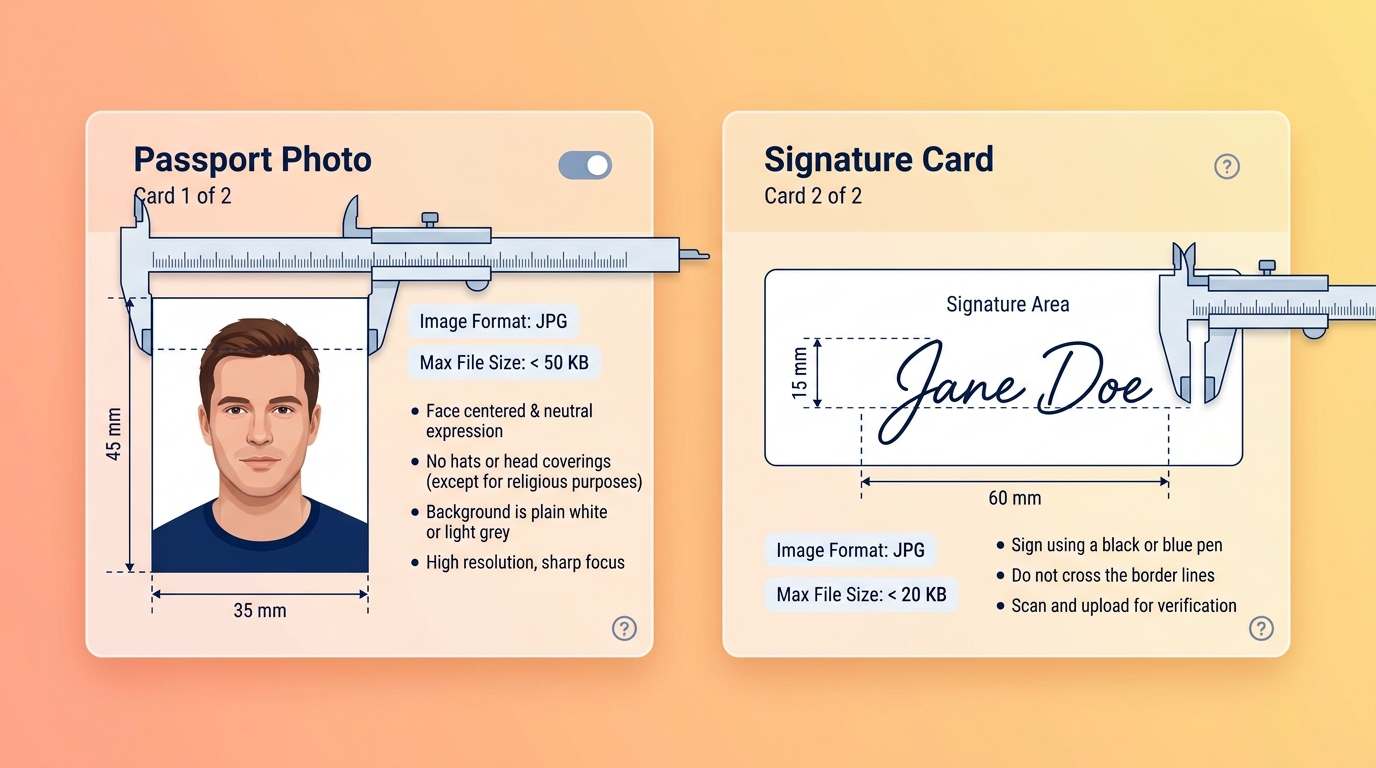
For Account Registration / Profile Photo
| Parameter | Requirement |
|---|---|
| File format | JPEG / JPG only |
| File size | Maximum 50KB |
| Dimensions | 3.5cm × 4.5cm (passport size) |
| Background | White or light-coloured |
| Resolution | Minimum 100×130 pixels |
For Tatkal Booking (Identity Proof Photo)
When booking Tatkal tickets, IRCTC requires you to upload a photo ID. The photo embedded in your ID (Aadhaar, PAN, Voter ID) must be clearly visible. The document scan itself must meet:
| Parameter | Requirement |
|---|---|
| File format | JPEG / JPG |
| File size | Maximum 100KB |
| Scan quality | Clear, all text readable |
| Orientation | Portrait (upright) |
For Signature Upload
| Parameter | Requirement |
|---|---|
| File format | JPEG / JPG |
| File size | Maximum 30KB |
| Dimensions | 3.5cm × 1.5cm |
| Background | White |
| Ink colour | Black or dark blue |
How to Resize Your Photo for IRCTC
Method 1: Using TinyTools (Recommended)
- Go to tinytools.in/tools/irctc-photo-resizer
- Upload your passport-size photo (JPG, PNG, or WEBP)
- The tool automatically compresses it to under 50KB
- Download and upload to IRCTC
Method 2: For Signature Upload
If you need to upload your signature:
- Sign on white paper with a black or dark blue pen
- Take a clear photo of the signature in good lighting
- Use our Signature Cropper to remove the white background and crop to just the signature
- Resize to under 30KB using Resize Image to 20KB
Common IRCTC Photo Upload Errors and Fixes
"File size exceeds the limit"
Your photo is larger than 50KB. Fix: Use Resize Image to 50KB to compress it.
"Invalid file format"
IRCTC only accepts JPEG/JPG files. If your photo is PNG or HEIC (iPhone format), convert it first. Use our HEIC to JPG converter if you are on an iPhone.
"Image dimensions are not valid"
Your photo is either too small (under 100×130 pixels) or the aspect ratio is wrong. A standard passport photo at 200×260 pixels works perfectly for IRCTC.
"Please upload a clear photo"
This error appears when the image is too blurry or the face is not clearly visible. Retake the photo in better lighting.
Tips for Tatkal Booking Success
Prepare your photo before the booking window opens. Tatkal booking opens at 10:00 AM for AC classes and 11:00 AM for non-AC classes. Have your resized photo ready the night before.
Save the resized photo to your phone's gallery. Do not rely on re-downloading from a tool during the booking window. Save the file locally.
Keep a backup on Google Drive or WhatsApp. If you switch devices during booking, you need the file accessible immediately.
Check the file size before uploading. On Android, long-press the file and tap "Details" or "Properties" to see the size. On iPhone, open the Files app and tap the file.
IRCTC Aadhaar-Linked Booking
For Aadhaar-linked Tatkal booking, IRCTC verifies your identity against the Aadhaar database. You do not need to upload a separate photo — your Aadhaar photo is used automatically. However, your IRCTC profile photo must still meet the standard requirements.
Frequently Asked Questions
Can I use a scanned photo for IRCTC?
Yes, as long as it meets the size and format requirements. Scan at 150 DPI, save as JPEG, and compress to under 50KB.
Does IRCTC accept PNG photos?
No. IRCTC specifically requires JPEG/JPG format. Convert PNG to JPG before uploading. Our Resize Image to 50KB tool outputs JPEG automatically.
How do I check my photo size on a phone?
On Android: Open the Files app, navigate to your photo, long-press it, and tap "Info" or "Details." On iPhone: Open the Files app, tap the file once, and the size appears below the filename.
My photo is 48KB but IRCTC still rejects it. Why?
Check the file format — it must be JPEG, not PNG saved with a .jpg extension. Also verify the dimensions are at least 100×130 pixels. If both are correct, try a different browser (Chrome works best with IRCTC).
Can I use the same photo for IRCTC and passport applications?
Yes. A standard 35×45mm white-background passport photo meets IRCTC requirements. Just ensure the file size is under 50KB.
Resize Your Photo Now
Do not let a file size error cost you a Tatkal ticket. Use our Resize Image to 50KB tool to prepare your IRCTC photo in seconds — free, no account, works on mobile.