
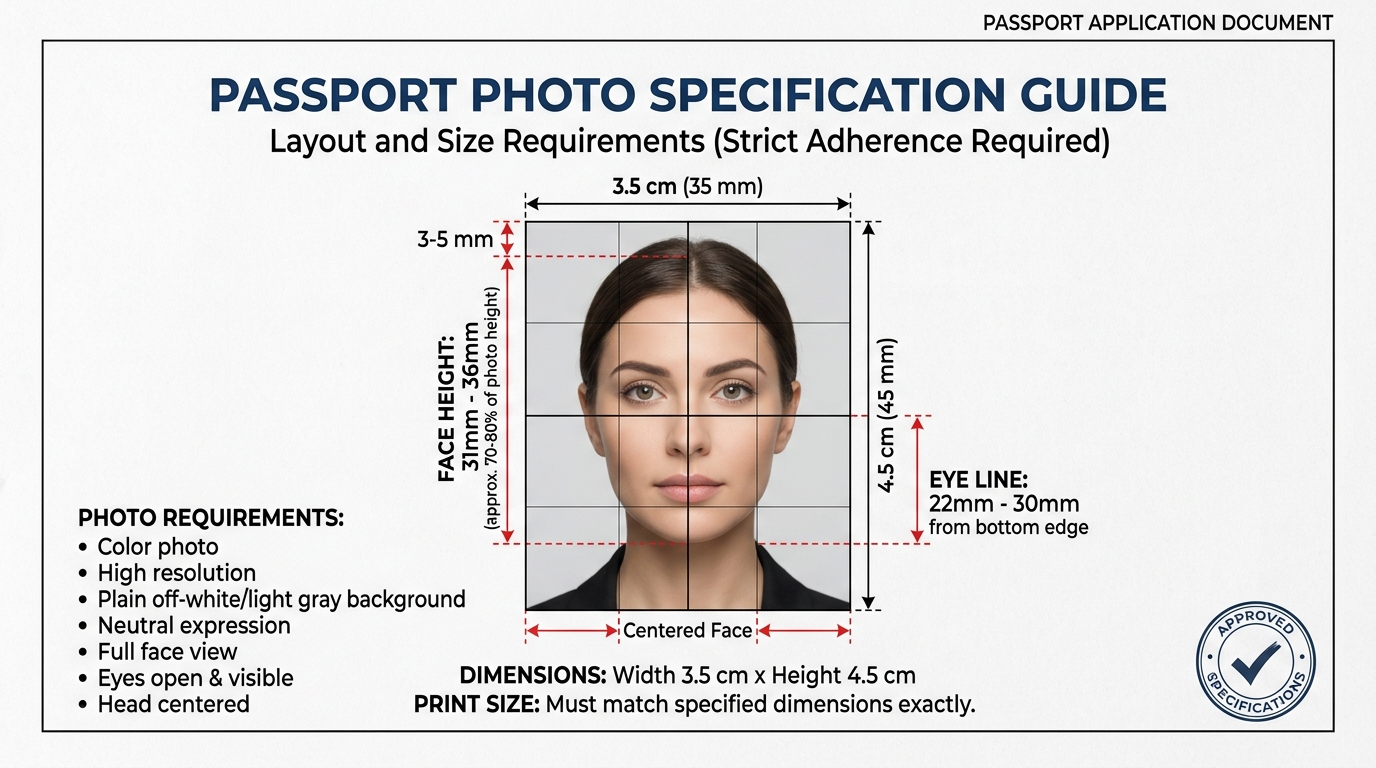
Every official document application in India — whether you are applying for a passport, renewing your Aadhaar card, or submitting forms for UPSC or banking exams — requires a passport-size photograph. And every portal seems to have its own set of slightly different rules.
This guide covers the exact specifications for passport-size photos accepted across all major Indian government portals in 2026. Get these wrong and your application gets rejected before anyone even reads your name.
Standard Indian Passport Photo Dimensions
Definition: An Indian passport-size photograph is a standardized identity portrait measuring exactly 35mm in width and 45mm in height (3.5cm × 4.5cm). It requires a plain white background, neutral facial expression, and 70% to 80% face coverage to meet international ICAO biometric standards.
"According to the Ministry of External Affairs (MEA), photographs that do not meet the strict 35x45mm dimension, white background, or no-glasses rules account for the leading cause of passport application delays and rejections."
The Government of India Ministry of External Affairs specifies the following requirements for passport photographs:
| Requirement | Specification |
|---|---|
| Photo size | 35mm × 45mm (3.5cm × 4.5cm) |
| Background | White or off-white (no patterns, no shadows) |
| Face coverage | 70%–80% of the total photo area |
| Head position | Looking directly at camera, no tilt |
| Expression | Neutral, mouth closed |
| Glasses | Not permitted (since 2021 guidelines) |
| File format (online) | JPEG/JPG |
| File size (Passport Seva) | 10KB to 1MB |
The 35×45mm format is also the standard used by most other Indian government IDs, which is convenient — one correctly prepared photo usually works across multiple documents.
Aadhaar Card Photo Requirements (UIDAI)
UIDAI, the body that manages Aadhaar, has slightly different technical specs than the Passport Seva portal:
- Minimum resolution: 200×200 pixels
- Preferred resolution: 413×531 pixels (equivalent to 35×45mm at 300 DPI)
- Maximum file size: 50KB
- Accepted format: JPEG only
- Background: White or off-white
PAN Card Photo Requirements (NSDL/UTIITSL)
PAN card photo specifications from NSDL and UTIITSL:
- Size: 3.5cm × 4.5cm (same as passport standard)
- File size: Under 20KB for online applications
- Format: JPEG
- Background: White
- Face: Clear, looking forward, no sunglasses
JEE, NEET, and Competitive Exam Photo Requirements
CBSE and NTA (the agency that conducts JEE and NEET) require:
| Portal | File size | Dimensions | Format |
|---|---|---|---|
| JEE Main | 10KB – 200KB | 3.5cm × 4.5cm | JPEG |
| NEET UG | 10KB – 200KB | 3.5cm × 4.5cm | JPEG |
| UPSC | 40KB – 100KB | 35×45mm | JPEG |
| SSC CGL | 4KB – 12KB | 35×45mm | JPEG |
SSC CGL has the strictest limit at 12KB. Getting a recognisable face in 12KB requires smart compression — standard tools often destroy image quality at this size. Adaptive compression, which our Resize Image to 20KB tool uses, handles this case better than simple quality sliders.
How to Take a Compliant Passport Size Photo at Home
You do not need a professional photographer or photo studio for standard government ID photos. A smartphone and a white wall are enough if you follow these steps:
- Background: Stick a white bedsheet or large white chart paper to a wall. Avoid shadows — natural window light from the side works better than direct overhead light.
- Framing: Ask someone to take the photo for you. Stand about 1 metre from the background. Your face and full shoulders should be visible.
- Lighting: Face toward the light source. Avoid harsh shadows across your face.
- Expression: Eyes open, looking directly at the lens. Neutral expression. No smile with teeth showing for passport photos.
- Crop and resize: Once you have the photo, use a free tool like our Passport Size Photo Maker to crop to 35×45mm proportions and resize to the portal's required dimensions and file size.
Frequently Asked Questions
What is the exact size of a passport photo in India in millimetres?
The exact size of a standard Indian passport photo is 35mm wide by 45mm tall (3.5cm × 4.5cm). This applies to passport, Aadhaar, PAN card, and most competitive exam portals.
Can I use a colored background instead of white for a passport photo?
No, you cannot use a colored background. Most Indian government document portals require a white or off-white plain background. Coloured, textured, or patterned backgrounds often lead to rejection.
What is the pixel size for a passport photo in India?
The standard pixel size for a 35×45mm passport photo at 300 DPI is 413×531 pixels. Many portals accept photos from 200×200 pixels up to 600×600 pixels. Check your specific portal's guidelines.
Why is my photo rejected even though it looks correct?
The most common causes are: file size too large (even if it looks right on screen), wrong file format (PNG instead of JPEG), coloured background, or the face not covering enough of the frame. Check the file size in bytes in your file manager before uploading.
Prepare Your Photo Now
Stop guessing and get it right the first time. Use our free Passport Size Photo Maker to create a properly sized 35×45mm photograph that meets Indian government specifications — no account needed, works on mobile, processed privately in your browser.