
Applying for a Permanent Account Number (PAN) card or enrolling for an Aadhaar Card is an essential step for managing finances, filing taxes, and verifying identity in India. Today, both processes can be initiated online. However, thousands of online applications are rejected weekly due to document upload failures.
Automated verification software checks every file upload. If a passport photo or signature scan is even slightly off in aspect ratio, pixel width, resolution (DPI), or file size in kilobytes (KB), the portal will reject the file or block the application from moving forward.
This comprehensive guide details the exact photo and signature size specifications for the Income Tax Department's official PAN portals (Protean / NSDL e-Gov and UTIITSL) and the Unique Identification Authority of India's Aadhaar portal (UIDAI).
1. NSDL / Protean PAN Card Photo & Signature Specifications
The Protean tin-nsdl portal is the most common platform used to apply for a new PAN card or request a correction. It uses strict client-side validation that immediately rejects photos or signatures exceeding 20KB.
Photograph Requirements (NSDL)
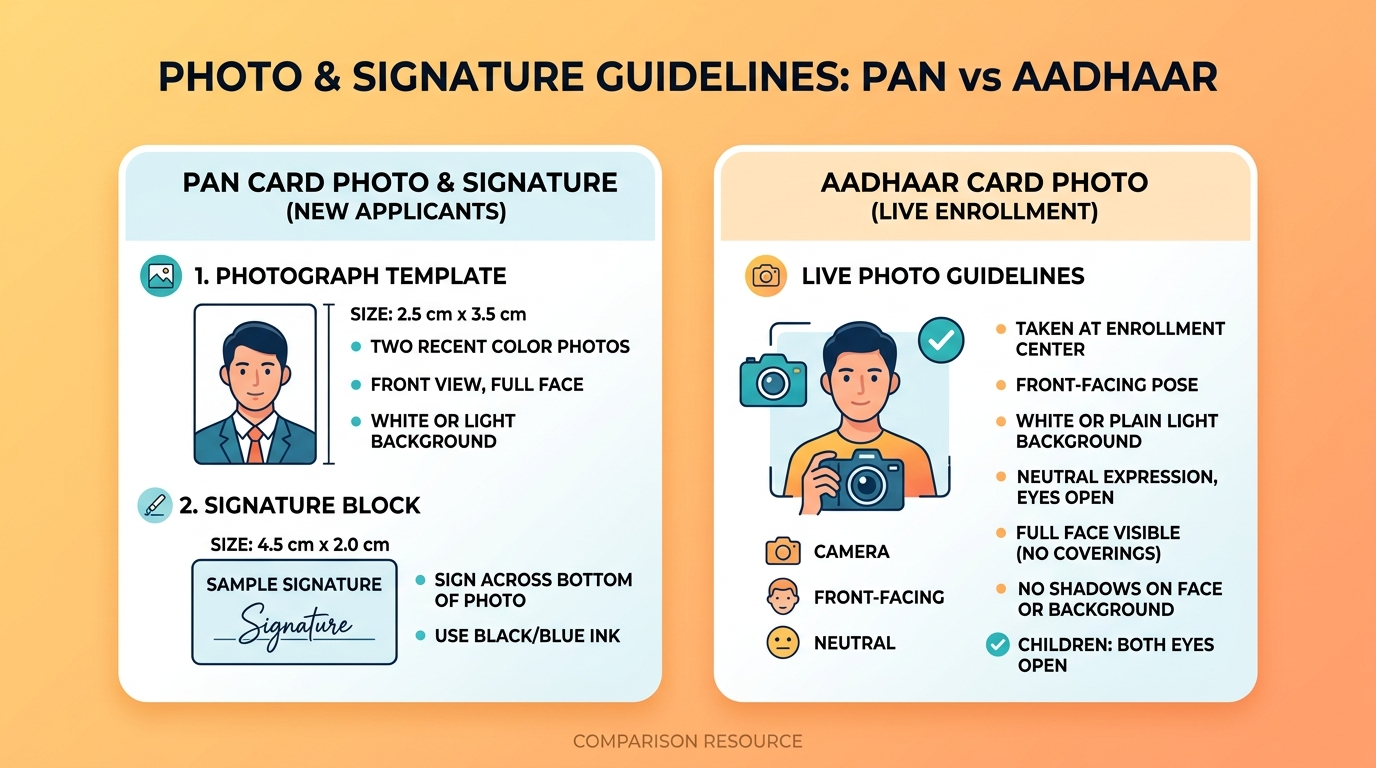
- Physical Size: The photo must measure exactly 2.5 cm × 3.5 cm (or 25mm × 35mm).
- Pixel Dimensions: At the standard 300 DPI scanning resolution, this translates to 295 pixels wide by 413 pixels high.
- File Format: Only JPEG or JPG formats are accepted. PNG, PDF, or GIF files will result in an "Invalid File Format" error.
- File Size: Must be between 10KB and 20KB.
- Composition: The face should be centered and cover 70–80% of the frame. The background must be plain white or off-white.
Signature Requirements (NSDL)
- Physical Size: The signature area must measure exactly 2.0 cm × 4.5 cm (or 20mm × 45mm).
- Pixel Dimensions: At 300 DPI, this is 236 pixels wide by 531 pixels high.
- File Size: Must be between 10KB and 20KB.
- Pen & Paper Rules: The applicant must sign on plain white paper (no lines or grids) using a black ink pen. Signatures in blue ink or pencil are frequently flagged and rejected by automated scanners.
Quick Reference: NSDL / Protean Specifications Table
| Document Type | Physical Dimensions | Pixels (at 300 DPI) | File Size Range | Acceptable Formats | Background / Ink |
|---|---|---|---|---|---|
| Passport Photo | 2.5 × 3.5 cm | 295 × 413 px | 10KB – 20KB | JPEG / JPG | Plain white |
| Signature Scan | 2.0 × 4.5 cm | 236 × 531 px | 10KB – 20KB | JPEG / JPG | Black ink on white paper |
2. UTIITSL PAN Card Photo & Signature Specifications
Some applicants use the UTIITSL PAN portal. While the physical sizes are identical to NSDL, the technical upload portal accepts larger file sizes but enforces a highly specific square pixel requirement for the photograph.
Photograph Requirements (UTIITSL)
- Physical Size: 2.5 cm × 3.5 cm.
- Pixel Resolution: The portal requests a square scan of 213 × 213 pixels at 300 DPI.
- File Size: The maximum file size limit is slightly higher at 30KB.
- File Format: JPEG / JPG only.
Signature Requirements (UTIITSL)
- Physical Size: 2.0 cm × 4.5 cm.
- DPI Specification: Must be scanned at 600 DPI (dots per inch) to ensure legibility when printed on the card.
- Pixel Resolution: At 600 DPI, this equates to 472 pixels high by 1062 pixels wide.
- File Size: The maximum file size limit is 60KB.
- Pen & Paper Rules: Sign on plain white paper. Blue or black ink is accepted.
Quick Reference: UTIITSL Specifications Table
| Document Type | Physical Dimensions | Pixels / DPI | Max File Size | File Format | Background / Ink |
|---|---|---|---|---|---|
| Passport Photo | 2.5 × 3.5 cm | 213 × 213 px (300 DPI) | 30KB | JPEG / JPG | Plain white or light grey |
| Signature Scan | 2.0 × 4.5 cm | 472 × 1062 px (600 DPI) | 60KB | JPEG / JPG | Black or blue ink |
3. Aadhaar Card Photo Guidelines (UIDAI Enrolment)
Unlike the PAN portals, the Unique Identification Authority of India (UIDAI) does not allow you to upload a digital photo file for enrolment or correction. To prevent identity fraud, UIDAI requires that your photograph be captured live at an authorized Aadhaar Enrolment Centre using a calibrated webcam.
However, understanding the capture guidelines helps ensure your live photo passes UIDAI quality standards on the first try.
Live Capture Guidelines:
- Background Screen: The operator must place a solid white or light-grey screen behind you. Ensure no other objects or people are visible in the background frame.
- Neutral Expression: Keep your face relaxed, eyes open, and mouth closed. Smiling, frowning, or blinking during capture is not allowed.
- Face Angle: Look straight into the camera lens. Head tilts or side profiles are rejected.
- Clothing Contrast: It is highly recommended to wear dark-colored clothing (such as black, dark blue, or maroon). This creates a clean silhouette contrast against the white background.
- Accessories: Remove sunglasses, tinted spectacles, caps, hats, and scarves before the photo is taken. Spectacles with clear lenses are allowed, but they must not create flash glare over your eyes.
- Religious Headwear: Head coverings (like turbans or hijabs) are permitted, but they must be adjusted so that your full face — from the chin to the top of your forehead — is completely visible.
Minor (Bal Aadhaar) and Child Photo Rules:
- For children under the age of 5, biometrics (fingerprints and iris scans) are not registered; only a photograph is captured.
- The child must be sitting straight, looking at the camera with eyes open.
- If a baby is held by a parent, the parent's hands, face, or body must not appear in the photograph frame. A white sheet can be draped over the parent to create a neutral background.
Mandatory Biometric Updates (MBU) for Children:
A child's facial features change rapidly. UIDAI mandates two free photo and biometric updates during childhood:- At Age 5: The child's first mandatory biometric update must be done to replace the toddler photo.
- At Age 15: The final biometric update must be completed to register adult facial structures and fingerprints.
4. Troubleshooting Common Portal Upload Errors
If you encounter errors while submitting documents on NSDL or UTIITSL, check these common causes and fixes:
Error 1: "File Size Exceeds Limit"
- Cause: Your file is larger than 20KB (NSDL) or 30KB/60KB (UTIITSL).
- Fix: Use our Passport Size Photo Maker and adjust the file size slider down to 15KB before exporting.
Error 2: "Invalid File Format"
- Cause: You uploaded a PNG, PDF, or a file whose extension was manually renamed (e.g., renaming
photo.pngtophoto.jpg). The portal detects the underlying file headers. - Fix: Convert the file using an actual image converter. Our tool automatically outputs a true JPEG container.
Error 3: "Signature is not clear / DPI too low"
- Cause: The signature was scanned at a low resolution (under 300 DPI) or written on ruled/lined paper.
- Fix: Sign on a completely blank sheet of white printer paper using a black ink pen. Take a well-lit photo of the signature (avoiding shadows) and crop it to the
4.5 x 2.0 cmpreset.
5. Critical Signature Rules for PAN Cards
To ensure your signature scan is approved, adhere to these guidelines:
- No Capital Letters: Do not write your name in block/capital letters. The Income Tax Department rejects signatures written in full capital letters (e.g., writing "HARMIN SHAH" instead of a running cursive signature).
- Thumb Impressions: If an applicant is illiterate and cannot sign, a left-hand thumb impression is accepted. However, it must be verified and attested by an authorized Magistrate, Notary, or Gazetted Officer with an official seal on the physical form.