
Create Studio-Grade Passport Photos at Home: Official Dimension & Background Rules
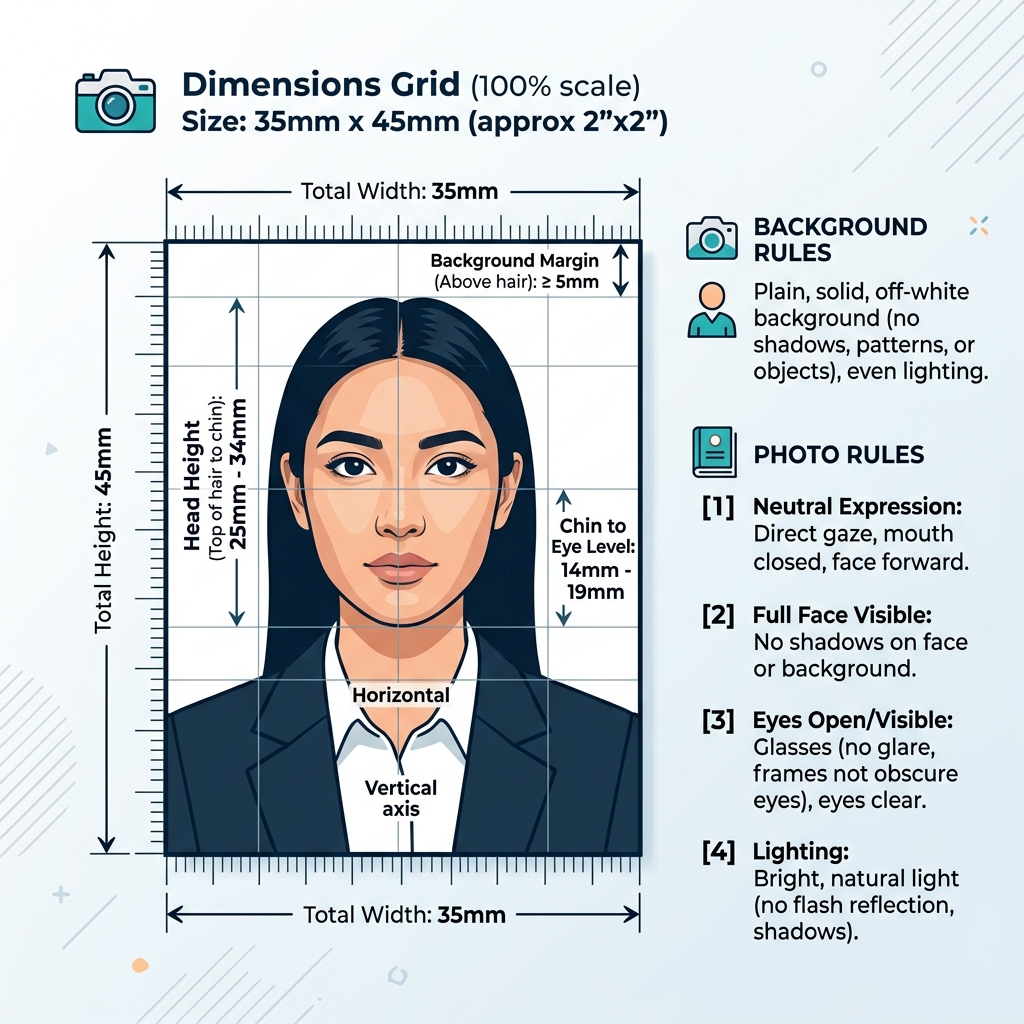
Visiting professional photo studios multiple times for government document applications (such as Passport Seva India, Aadhaar updates, PAN card applications, Visa filings, or Competitive Entrance Exams like NEET, JEE, and UPSC) is time-consuming and unnecessary.
With modern high-resolution smartphone cameras and precise digital cropping tools, you can easily shoot, crop, and generate official studio-grade passport photographs right from home—completely free of charge.
Global Passport Photo Specifications Comparison
Different government agencies enforce distinct physical dimensions, background colors, and resolution thresholds. Review the breakdown below to ensure your photo matches your target country or portal specification:
| Application & Country | Physical Size (mm / inches) | Resolution in Pixels (300 DPI) | Background Requirement | Face Coverage % |
|---|---|---|---|---|
| Indian Passport (Passport Seva) | 35 mm × 45 mm | 413 × 531 pixels | Plain White / Off-White | 70% – 80% |
| US Passport & US Visa (2×2 inch) | 51 mm × 51 mm (2″ × 2″) | 600 × 600 pixels | Plain Off-White / White | 50% – 69% |
| Schengen Visa (Europe) | 35 mm × 45 mm | 413 × 531 pixels | Light Grey / Plain White | 70% – 80% |
| UK Passport & Driving Licence | 35 mm × 45 mm | 413 × 531 pixels | Plain Light Grey / Cream | 65% – 75% |
| Aadhaar Card & PAN Card (India) | 35 mm × 45 mm / 200 × 200px | 413 × 531 / 200 × 200px | White Background | 70% – 80% |
Detailed Rules Enforced by Passport Seva India & MEA
The Ministry of External Affairs (MEA) and UIDAI maintain automated image recognition systems. Photos failing any of the following criteria are automatically rejected by online submission portals:
1. Facial Positioning & Head Coverage
- The facial region (from the bottom of the chin to the top of the head) must occupy 70% to 80% of the frame height.
- Both ears must be completely visible without hair covering the side profiles.
- Keep shoulders square to the camera lens without tilting your head.
2. Eyewear & Headgear Rules (Updated Policy)
- Spectacles / Glasses: Eyeglasses and tinted sunglasses are strictly forbidden in recent passport photo standards to avoid flash glare over pupils.
- Headwear & Religious Coverings: Religious headgear (such as turbans or hijabs) is permitted, provided the face is fully visible from the chin line to the top forehead line without casting shadows across cheeks.
3. Lighting & Background Color
- Use a completely plain, smooth white background without textures, wallpapers, or drop shadows behind head edges.
- Ensure uniform facial lighting to prevent strong shadow contours under nose, chin, or eye sockets.
Step-by-Step Guide: Shooting a Studio Photo at Home
Follow these simple steps to take a professional photograph using your mobile phone:
- Find Natural Window Light: Stand facing a large window during daylight hours. This provides soft, shadowless lighting on your face.
- Setup Background: Stand 2 to 3 feet in front of an unpatterned white wall or plain white sheet. Standing away from the wall eliminates harsh background shadows.
- Use Rear Camera (No Selfies): Ask a family member to take the photo or set your phone on a tripod with a 3-second timer. Use the rear camera lens (1x optical mode) to prevent facial distortion caused by front-facing selfie lenses.
- Maintain Neutral Expression: Look directly into the camera lens with eyes wide open, lips closed, and a neutral, professional posture.
- Crop with Online Tool: Upload your image to our free Passport Size Photo Maker. Adjust the interactive crop boundary to align your eyes, nose, and chin within the official 35×45mm guide lines.
Top 5 Reasons Passport Photos Get Rejected
- Flash Glare / Red Eye: Using camera flash directly in dark rooms causes pupils to glow red or reflect glass glare.
- Incorrect Crop Ratio: Uploading generic square photos where the face takes up only 40% of the total image area.
- Shadows Behind Head: Standing right against a wall under a single ceiling light bulb creates dark shadows around the shoulders.
- Low Image Resolution: Using heavily compressed WhatsApp or social media photos with pixelated artifacts.
- Over-Editing / Heavy Filters: Applying beauty filters or skin smoothing apps alters natural skin tone and facial structure, causing portal rejection.
How to Print 8 Passport Photos on a 4x6 Sheet
Once you have formatted your 35×45mm passport photo using our tool, you can print multiple copies on a standard photo sheet at any local print shop or home photo printer:
- Download the generated high-resolution 300 DPI passport file.
- Place 8 identical copies on a standard 4″ × 6″ (10 × 15 cm) photo canvas layout.
- Save as JPG and take it to any digital printing center (or use your inkjet photo printer on glossy photo paper).
- Printing an 8-in-1 sheet on standard 4x6 paper costs under ₹15-₹20 total, saving over 80% compared to traditional photo studios.
Frequently Asked Questions
Can I use a selfie captured with my front camera?
Front-facing camera lenses have shorter focal lengths that distort facial dimensions (making the nose appear wider and ears smaller). It is strongly advised to use the rear camera held 4 to 5 feet away.What digital file size (in KB) is accepted for Passport Seva India?
Most online portals require photos between 20 KB and 200 KB in JPG/JPEG format. Our Passport Photo tool allows you to optimize output file size directly within official KB thresholds.Is a white shirt allowed for a white background photo?
While permitted, wearing dark-colored clothing (such as navy blue, black, or dark grey) is recommended so your shoulders contrast clearly against the plain white background.Create Your Passport Photo Now
Save time and money today. Use our browser-based Passport Size Photo Maker to crop, adjust, and format your photos to exact 35×45mm specifications in seconds with 100% privacy.